

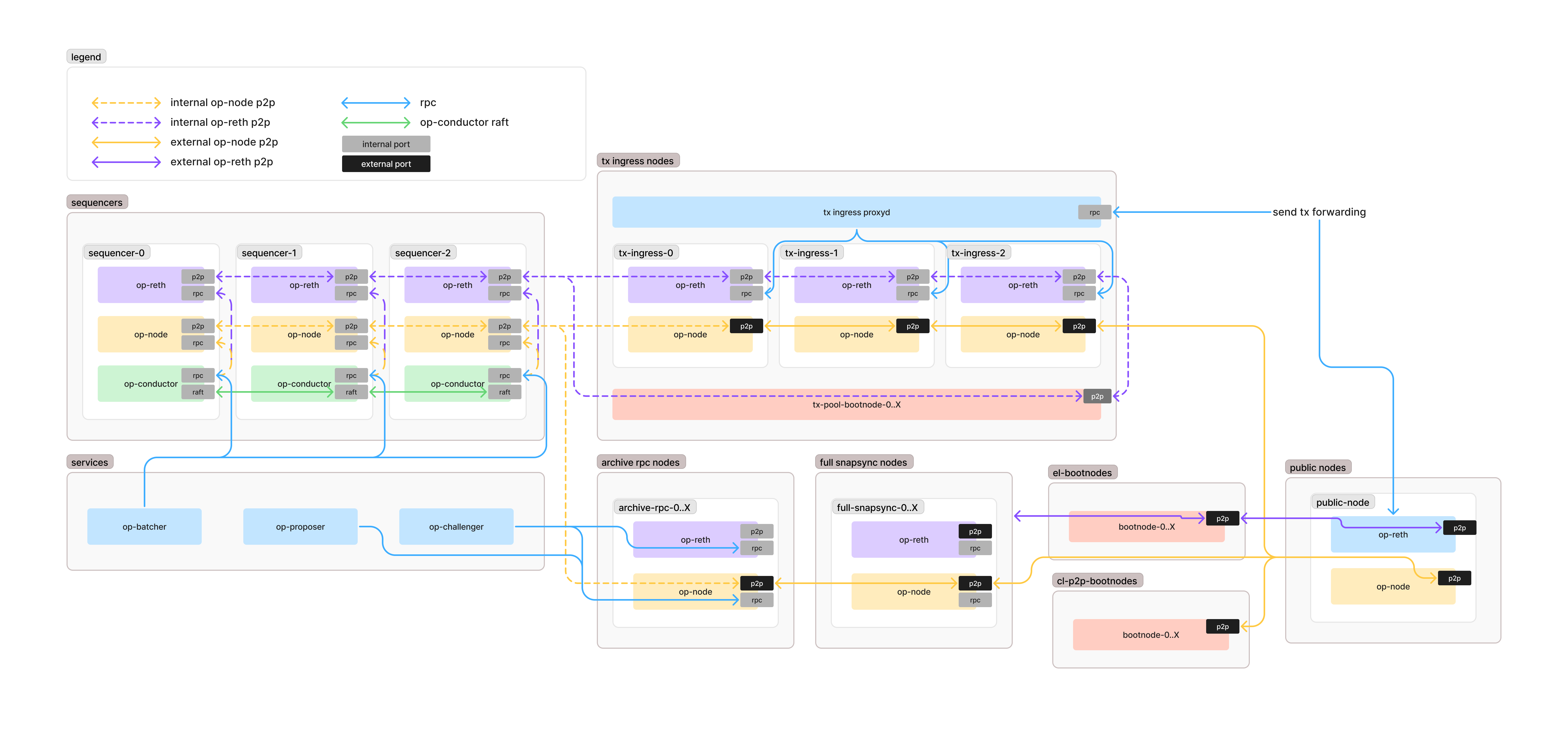
Sequencers
Sequencers receive transactions from the Tx Ingress Nodes via execution-layer p2p gossip and work with the batcher and proposer to create new blocks.Node Configuration
- Sequencer op-reth can be either full or archive. op-reth runs as an archive node by default; pass
--fullto run a (pruned) full node. Full nodes offer better performance but can’t recover from deep L1 reorgs, so run at least one archive sequencer as a backup. - Sequencer op-node should have p2p discovery disabled and only be statically peered with other internal nodes (or use peer-management-service to define peering network).
- The op-conductor RPC can act as a leader-aware RPC proxy for op-batcher (proxies the necessary op-reth / op-node RPC methods if the node is the leader).
- Sequencers should have local transaction backup (journalling) disabled.
op-node Configuration
op-reth Configuration
op-reth is configured via CLI flags rather thanGETH_* environment variables:
Tx Ingress Nodes
These nodes receiveeth_sendRawTransaction calls from the public and then gossip the transactions to the internal execution-layer network. This allows the Sequencer to focus on block creation while these nodes handle transaction ingress.
Node Configuration
- These can be either full or archive nodes.
- They participate in the internal tx pool p2p network to forward transactions to sequencers.
Configuration
Archive RPC Nodes
We recommend setting up some archive nodes for internal RPC usage, primarily used by the challenger, proposer, and security monitoring tools like monitorism.Node Configuration
- Archive nodes are essential for accessing historical state data.
- You can also use these nodes for taking disk snapshots for disaster recovery.
Configuration
op-reth runs as an archive node by default, so no extra flags are required — simply do not pass--full (which enables pruning; the upstream --minimal flag is not supported and op-reth rejects it at startup). op-reth stores state in MDBX plus static files, so the geth-specific GETH_DB_ENGINE and GETH_STATE_SCHEME options have no equivalent.
Full Nodes
These nodes run as full (pruned) nodes. op-reth does not implement geth-style snap sync; it syncs using its own staged-sync pipeline, so the gethGETH_SYNCMODE, GETH_DB_ENGINE, and GETH_STATE_SCHEME options do not apply.
Configuration
P2P Bootnodes (Execution Layer)
These bootnodes facilitate peer discovery for public op-reth nodes.Node Configuration
- The bootnode can be an op-reth instance or the geth bootnode tool.
- You may want to make your Full Nodes serve as your bootnodes as well.
P2P Bootnodes (Consensus Layer)
These are the op-node p2p network bootnodes. We recommend using the geth bootnode tool with discovery v5 enabled.Public RPC
Public RPC design is not listed in the above diagram but can be implemented very similarly to Tx Ingress Nodes, with the following differences:Configuration Differences
- Public RPC should not participate in the internal tx pool p2p network.
- While it is possible to run Public RPC from the same nodes that serve Tx Ingress and participate in tx pool gossip, there have been execution-client bugs in the past that leaked tx pool details on read RPCs, so it is a possible risk to consider.
- Public RPC proxyd should be run in
consensus_awarerouting mode and whitelist any RPCs you want to serve from op-reth. - Public RPC nodes should likely be archive nodes.
About proxyd
Proxyd is an RPC request router and proxy that provides the following capabilities:- Whitelists RPC methods.
- Routes RPC methods to groups of backend services.
- Automatically retries failed backend requests.
- Tracks backend consensus (latest, safe, finalized blocks), peer count and sync state.
- Re-writes requests and responses to enforce consensus.
- Load balances requests across backend services.
- Caches immutable responses from backends.
- Provides metrics to measure request latency, error rates, and the like.
Next steps
- Learn more about using proxyd for your network.